

About letterhub.io Compliance
Background & Objectives
letterhub.io was developed as a modern replacement for the fax machine, which is still widely used in Austria—particularly in the healthcare sector, where patient data must be transmitted reliably and confidentially.
GTELG Requirements vs. Security Implementation
The amendment to the GTELG (Health Telematics Act) sets strict requirements:
- End-to-End Encryption: Data must not be readable during transmission and storage.
- Authentication: Only the intended recipient can decrypt documents.
- Data Protection & Deletion: Documents must be securely deleted after legal retention periods.
letterhub.io meets these requirements through:
- Browser-side PGP encryption (OpenPGP.js), where the server only stores ciphertext.
- Magic link tokens control key and access management without traditional passwords.
- Automated expiration control (14 days), file self-cleanup, and sender notification.
Technical Security Concept
- Asymmetric Key Pair: RSA-2048, generated and protected in the browser.
- Public Key Storage: Stored in the database as ASCII-armored text (no transport of secrets).
- Client-side Encryption Workflow:
- File is encrypted via openpgp.
- Encrypted blob (.gpg) is sent to the server via HTTPS.
- Download uses PGP decryption in the browser, with a private key and passphrase.
- Token-based Sessions: Magic links allow time-limited, specific actions (upload, key setup, download).
- Expiration & Deletion: An expired_at column and a cleanup script remove files after 14 days and inform the sender.
- Integrity Checks: Optional signing via PGP notation, can be extended.
- Transport Layer: HTTPS+TLS for web and SMTP-TLS for emails.
PGP Security Architecture Overview
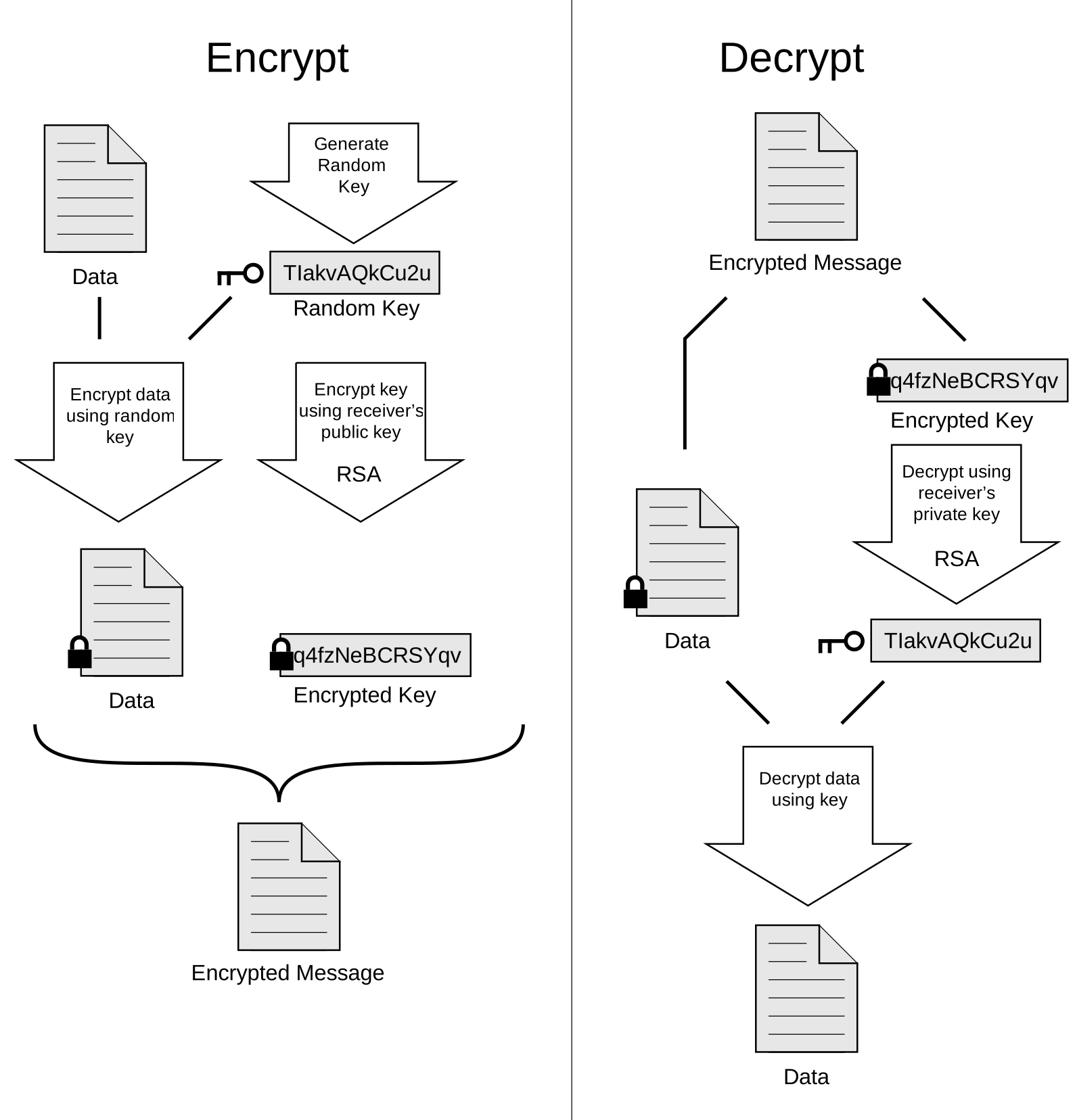
PGP (Pretty Good Privacy) combines asymmetric and symmetric methods: A random session key (symmetric cryptosystem) encrypts the message, and this key is in turn secured with the recipient’s public key (asymmetric cryptosystem, e.g. RSA).
- The sender generates a random session key in the browser implementation (OpenPGP.js).
- The plaintext is symmetrically encrypted with this session key.
- The session key is asymmetrically encrypted with the recipient’s public PGP key.
- Only the encrypted message and the encrypted session key are stored on the server.
- The recipient first decrypts the session key in the browser with their private PGP key and then decrypts the message with the restored session key.
This hybrid encryption ensures that only the legitimate recipient (end-to-end) can access the plaintext, while the server and third parties only see unreadable ciphertext.
User Guide
For Senders
- Go to the homepage and request a ticket via email.
- Open your email with the subject “New Document Dispatch Ready” and click the Start button.
- In the form, select your PDF, the recipient, and click Encrypt & Send.
- In the background, the document is PGP-encrypted and transferred to the server.
- You will see a confirmation, and your recipient will receive an email for download.
For Recipients
- Ask the administrator (e.g. Christoph) to be added to the recipient list.
- Visit Recipient Setup, enter your email, and request the setup link.
- Open the setup email and click the Start Recipient Setup button.
- Generate your PGP key pair or paste an existing public key and save it.
- In the download email, click the Download Document button, upload your private key, and enter the passphrase.
- The PDF is decrypted in the browser and downloaded automatically.
Important Notice
Your Private Key and your Passphrase are your only means of decrypting documents. If you lose them, the documents are irretrievably lost. Only the sender still possesses the original document.
Contact
For questions or assistance, you can reach me:
Christoph Mitsch